Trackers vs editors vs encoders
The hub groups trackers (drive a finished model), editors
(build or rig the file), and encoders (broadcast). Mixing those jobs is how
people install Cubism when they needed a finished Live2D in VTube Studio, or chase a “VTuber
Maker” download when they meant a tracker. Product pages keep the roles separate.
A tracker reads a camera or phone and moves an avatar. Editors such as Live2D Cubism are for artists and riggers, not
a go-live button. OBS Studio (or another encoder) composites the avatar
with game capture and chat. Debut steps that stitch those layers live in how to become a VTuber.
Best picks and how to choose VTuber software
The software people mean when they search “best VTuber software” is rarely one
program. A working setup is a short pipeline: art → rig → tracking app → OBS.
Mix those layers up and you buy Cubism when you needed VTube Studio, or you install VSeeFace for
a Live2D file that will never load. This section compares the three names that show up in almost
every beginner thread—VTube Studio, Live2D, and VSeeFace—then places them next to OBS and the
usual alternatives.
The VTuber software stack (jobs, not brands)
- Create the model — Live2D Cubism (2D) or Blender / a VRM exporter (3D)
- Track the performer — VTube Studio, PRISM, VSeeFace, Warudo, VNyan
- Encode the show — OBS Studio (or PRISM as an all-in-one)
You can debut without step 1 if you buy a premade model. You cannot skip step 2 or 3. PNGTubers
still follow the same idea with a simpler tracker.
VTube Studio
VTube Studio (VTS), by Denchi, is the default Live2D tracking app for indie VTubers. It is what most people should download if
their model is a .vtube.json / Live2D folder, not a 3D VRM.
VTS reads your face from a webcam or a phone, moves the Live2D mesh, fires hotkeys (jumps, tears, toggles), and outputs a transparent avatar you capture in
OBS. It is a runtime, not a drawing program. You do not design the character inside VTS;
you load a model someone already rigged. That split is why “I bought VTube Studio and I still
don’t have an avatar” is such a common stuck point.
Typical tracking sources:
- Desktop webcam (fast to try, more lighting-sensitive)
- iPhone / iPad face tracking (often stabler mouth shapes)
- Optional extra trackers depending on the model
Map a small hotkey set you will hit live: laugh, shock, one damage toggle. Ten
unused expressions help nobody during a raid. Send the avatar into OBS as a window or game
capture with a chroma/transparent background, then add the game, alerts, and chat.
VTube Studio is a paid Steam app; the price is small next to a custom model. PRISM Live Studio is the usual alternative if you want tracking plus broadcasting
in one package. Browser toys such as Kalidoface are fine for a test, not for a brand you intend
to keep. Pick VTS if you are (or will be) a 2D Live2D VTuber. Do not pick it as
your 3D home.
Live2D Cubism
Live2D is both a look and a company tool. Search results mash
them together. The look is a layered 2D illustration that turns and lip-syncs
without becoming a 3D mesh. Live2D Cubism is the editor from Live2D Inc.
Artists cut the illustration into parts, set deformers, and bake the rig. There is a free Cubism
editor tier and a paid Pro tier. File output is what VTube Studio (and other runtimes) consume.
You do not go live from Cubism. Cubism is Blender for 2D VTubers: a studio app,
not a stream overlay. A commission often has two invoices: the illustrator and the rigger. If a
shop lists “Live2D model,” ask whether you get commercial streaming rights, how
many expressions/toggles, and whether it is tested in VTube Studio.
You need Cubism as a streamer only if you will edit physics, add a new toggle, or build the model
yourself. Everyone else installs VTube Studio, drops in the model, and never opens Cubism.
VSeeFace
VSeeFace is the name that comes up when the question is 3D on a budget. It is a free Windows application that drives VRM avatars—the 3D format most indie 3D VTubers actually share. It tracks a
webcam onto a 3D model: head, mouth, sometimes more depending on setup. You can look around a
virtual space in a way Live2D facecams cannot.
- VSeeFace — free, 3D/VRM, enough for chatting and many game streams
- Warudo
(and similar paid 3D apps, including VNyan) — more scenes, props, effects, and “show” tools
when VSeeFace feels small
- VTube Studio — not the 3D choice; it is the Live2D choice
If someone tells you to “just download VSeeFace” for a Live2D model, they have mixed the stack.
Match the app to the file type.
OBS Studio and the broadcast stack
OBS Studio is still the standard encoder: scenes, audio
filters, stream keys, recordings. PRISM can replace it if you want fewer windows. Neither replaces
tracking. Around them you will usually add a microphone chain, a stream deck or equivalent, and
alert software. Bad audio with a $3,000 Live2D still loses to a PNGTuber with a clean mic.
Software comparison matrix
| Tool | Layer | Format | Price | Pick if |
|---|
| VTube Studio | Tracking | Live2D | Paid | You have a 2D model |
| VSeeFace | Tracking | VRM | Free | You have a 3D VRM |
| Warudo | Tracking | VRM/Live2D | Free + Pro | You need props and nodes |
| OBS Studio | Broadcast | Any capture | Free | Standard PC pipeline |
| PRISM Live Studio | Track + broadcast | Live2D/mobile | Free + paid | Fewer windows, mobile |
| Live2D Cubism | Authoring | Live2D | Free + Pro | You rig or edit models |
Common “vs” searches that are the wrong comparison
These queries mix layers, not rival products:
| Search | Real answer |
|---|
| OBS vs VTube Studio | You usually need both — tracker then encoder. |
| OBS vs VSeeFace | Same — VSeeFace tracks, OBS streams. |
| VTube Studio vs Live2D Cubism |
Cubism builds models; VTS plays them. Many creators use
both over a career, not instead of each other.
|
| VTube Studio vs VSeeFace | Valid — but it is really 2D vs 3D. See the section below. |
How to choose in one pass
| Your model | Tracking app to install first | Creation tool (only if you build it) |
|---|
Live2D / .vtube.json | VTube Studio (or PRISM) | Live2D Cubism |
| 3D VRM | VSeeFace, then Warudo if you outgrow it | Blender, VRoid, or a 3D commission |
| PNG / image swap | PNGTuber tools or a simple VTS PNG setup | Any drawing app |
Download one tracking app that matches the model you already have. Buy Cubism
only when you are the rigger. That single filter is the whole “best VTuber software” answer for
most searchers.
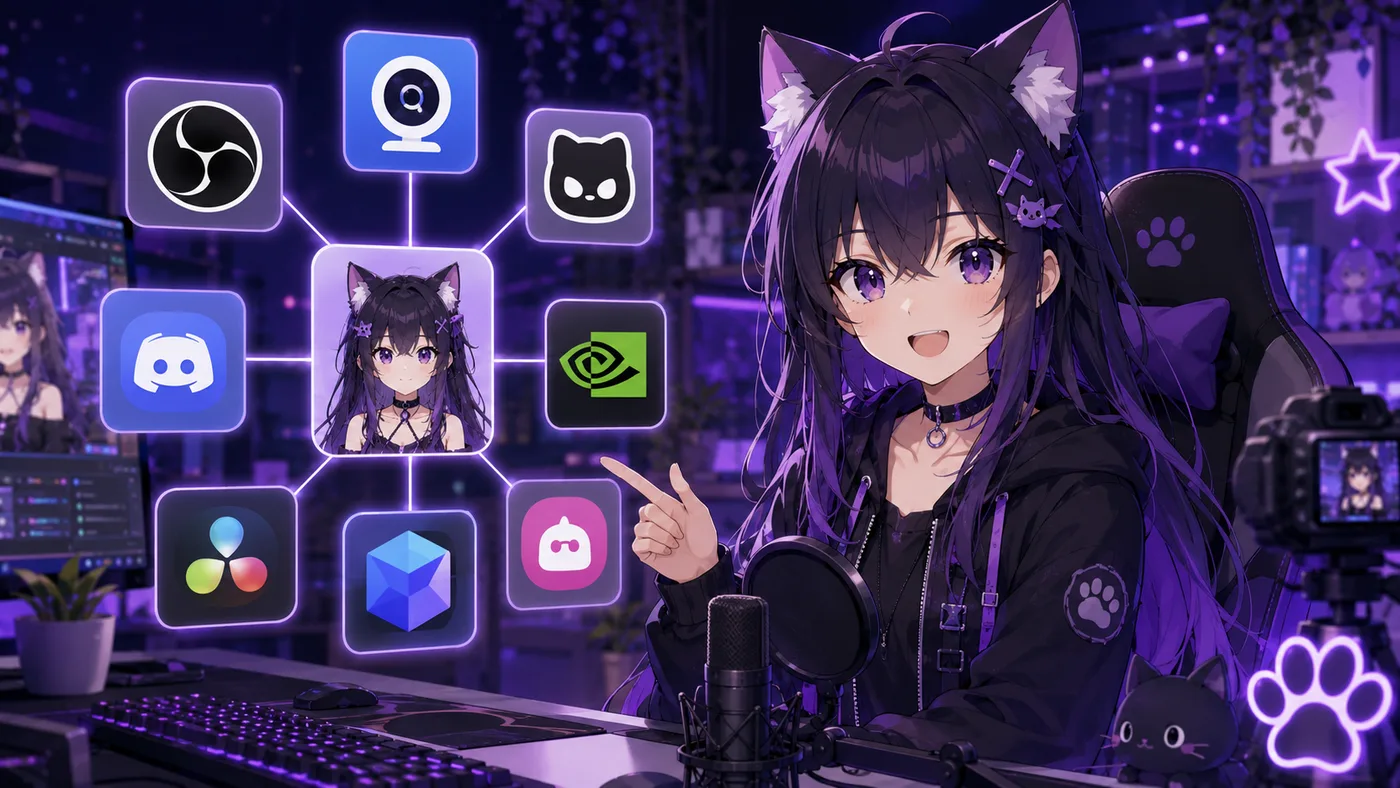
Which VTuber app to open for which file
People who search “VTuber app” usually want one download that makes an anime
face move on stream. This section is the app-first guide: which VTuber app to open for which
file, what belongs on the PC versus the phone, and how names like VTube Studio, Live2D,
VSeeFace, PRISM, and OBS fit together.
What “VTuber app” actually means
- Tracking app — reads your face or body and moves the model (VTube Studio,
VSeeFace, Warudo, VNyan, PRISM’s avatar layer)
- Model app / editor — builds or edits the avatar (Live2D Cubism, Blender,
VRoid)
- Broadcast app — encodes avatar + game + alerts to Twitch or YouTube (OBS
Studio, PRISM Live Studio)
- Helper apps — PNGTuber tools, mobile face bridges, alert overlays
Search engines lump all of that under “VTuber app.” Your job is to pick the tracking app that matches your model, then a broadcast app. You
only need Cubism or Blender if you are making the art yourself.
Best VTuber apps by job (quick picker)
| If you have… | Open this VTuber app first | Then broadcast with |
|---|
Live2D / .vtube.json model | VTube Studio | OBS Studio (or PRISM) |
| 3D VRM model | VSeeFace (free) or Warudo | OBS Studio |
| Still PNG frames |
A PNGTuber app / plugin
| OBS Studio |
| No model yet |
Do not buy Cubism first — get a premade or commission
| Practice mic + OBS |
Wrong picks are common: installing VSeeFace for Live2D, or buying Live2D Cubism thinking it is
the live VTuber app. Cubism does not replace VTube Studio on stream.
VTube Studio: the default Live2D VTuber app
VTube Studio is what most English-speaking indie Virtual YouTubers mean by “the VTuber app” when
their avatar is 2D. Use it when your file is Live2D-based, you want hotkeys and expression
toggles live, and you stream Just Chatting / games with a facecam-style crop. Skip it when your
only file is a 3D VRM—use a 3D VTuber app instead. Profile: VTube Studio.
VSeeFace and Warudo: 3D VTuber apps
VSeeFace is a free Windows app for VRM avatars—the usual first
3D VTuber app for indies. Warudo (and similar show-oriented tools) add scenes,
props, and effects when VSeeFace feels too bare for concert-style shows. Rule: model type picks the app. Live2D → VTube Studio. VRM → VSeeFace / Warudo. They
are not ranked “better”; they are different file pipelines.
Live2D Cubism is not your stream VTuber app
Cubism appears in every “VTuber app” search result because the format is named Live2D. Cubism is
the editor for illustrators and riggers. Streamers who only bought a finished
model never need to open Cubism to go live. If you are an artist building avatars, Cubism is
core. If you are a performer, your VTuber app is VTube Studio (or PRISM), not Cubism.
OBS Studio and PRISM: broadcast apps
OBS Studio is free and remains the default way to mix avatar, game, alerts, and chat browser
sources. The tracking VTuber app feeds OBS a window or transparent capture; OBS is what the
platform receives. PRISM Live Studio is an all-in-one some creators prefer: streaming features
plus avatar support in one package. Neither OBS nor PRISM replaces a model—they are the broadcast half of the stack.
Mobile tracking and PNGTuber apps
Phones show up as a face tracking bridge (often with VTube Studio’s companion
flow) or as lighter mobile-only experiments for short vertical video. For a serious channel,
treat the phone as a tracker, not as the whole studio. If you have no Live2D
yet, a PNGTuber tool is a valid first VTuber app—many people debut that way
while a custom model is in queue. See what VTubing is and how to become a VTuber.
How to choose a VTuber app in five minutes
- What file do you own? Live2D, VRM, or PNG.
- Match the tracking app to that file (table above).
- Install OBS (or PRISM) and send a test scene to an unlisted/private stream.
- Fix audio first — a great VTuber app with a bad mic still loses chat.
- Upgrade later — Warudo, iPhone tracking, and Cubism are optional until the
basics work.
Also confirm your model license allows monetized streams before you rely on any paid VTuber app
for income. Model rights are covered in the models directory.
VTube Studio vs VSeeFace: 2D Live2D or 3D VRM?
VTube Studio vs VSeeFace is the comparison beginners type when they have not
chosen a model yet. That is the wrong order—but the answer is simple once you separate 2D Live2D from 3D VRM.
Verdict: If your avatar is Live2D, install VTube Studio. If your avatar is a VRM file, install VSeeFace. Neither replaces OBS Studio for most streams.
| VTube Studio | VSeeFace |
|---|
| Model format | Live2D (.model3.json) | VRM (.vrm) |
| Look | Layered 2D illustration | 3D anime avatar |
| Price | Paid (Steam) | Free |
| Platform | Desktop + phone tracking | Windows |
| OBS needed? | Usually yes | Usually yes |
They sit in the same layer (face tracking) but read different file types. They are not interchangeable.
When to pick VTube Studio
- You bought or commissioned a Live2D model
- You want the classic indie VTuber facecam look
- You need hotkeys for expressions and toggles during chat streams
When to pick VSeeFace
- Your avatar is VRM (VRoid export, Blender, commission)
- You want free 3D tracking before paying for Warudo or VTuber Maker
- You like head movement and room-style framing 3D enables
Quick decision: (1) open your model folder—Live2D or VRM? (2) download the matching tracker (3)
install OBS or PRISM (4) debut before buying extra apps.
VSeeFace vs Warudo: free 3D or node-based power?
VSeeFace vs Warudo is a real same-layer choice: both track 3D VRM avatars on Windows and output to OBS. VSeeFace is the free baseline;
Warudo is the upgrade when you want props, nodes, and show-style control.
Verdict: Start with VSeeFace for your first 3D debut. Move to Warudo when you need reactive scenes beyond a single
tracked window.
| VSeeFace | Warudo |
|---|
| Price | Free | Free core; paid Pro features |
| Model focus | VRM | VRM + Live2D |
| Learning curve | Low | Medium–high (node graph) |
| Best for | Chat, games, first 3D | Props, reactive scenes, tech VTubers |
| OBS | Yes | Yes |
When VSeeFace is enough
- You just exported a VRoid model and want to go live this week
- You stream talking head + gameplay without AR props
- You want zero subscription before you prove the channel
When Warudo is worth the switch
- You need throwable props, multi-step reactive scenes, or fine motion control
- You are already comfortable with OBS and want the avatar layer to be programmable
- You outgrew VSeeFace but do not want a full Unity/Unreal pipeline
Neither app replaces VTube Studio for Live2D. Install order: VSeeFace + OBS + mic test → stream
until tracking settings are boring → trial Warudo only when you have a concrete scene idea that
VSeeFace cannot do.
VTube Studio vs PRISM Live Studio
This compares two Live2D tracking options—not 3D, not OBS itself. VTS is the
specialist; PRISM is the all-in-one alternative when you want fewer windows.
Verdict: Use VTube Studio if your model docs mention VTS or you
want the standard indie OBS pipeline. Try PRISM if you prefer mobile-first streaming with
built-in encoding.
| VTube Studio | PRISM Live Studio |
|---|
| Role | Live2D tracker | Tracker + broadcaster |
| OBS needed | Usually yes | Often no |
| Ecosystem | Steam, huge VTS model market | Mobile + desktop hybrid |
| Best for | PC VTubers, complex OBS scenes | Simpler stacks, phone tracking |
Pick VTS when your rigger tested the model in VTS, you already plan OBS scenes / Streamlabs
alerts / dual PC, or you want the default answer in every Live2D commission. Pick PRISM when you
want one app to track and go live quickly, phone face tracking matters more than desktop scene
complexity, or OBS feels like overkill for your first month. Wrong comparisons: PRISM vs
VSeeFace is 2D vs 3D; VTube Studio vs OBS is tracker vs encoder.
VSeeFace vs VTuber Maker (Live3D) + VTuber Maker guide
VSeeFace vs VTuber Maker compares two 3D entry apps—not
Live2D, not OBS. VSeeFace is the free community default; VTuber Maker (Live3D)
is a packaged Steam product with assets and a guided UI. Searches for VTuber Maker and vtubermaker usually mean that Live3D Windows
app—not a generic phrase for “software that makes you a VTuber.”
Verdict: Start with free VSeeFace and a VRoid export. Buy VTuber Maker only if you
want bundled assets and a polished onboarding UI without hunting downloads. If your model is Live2D, stop—vtubermaker will not load your file.
| VSeeFace | VTuber Maker (Live3D) |
|---|
| Price | Free | Free tier + subscription upsells |
| Models | VRM focus | VRM + bundled assets |
| Vibe | Community tool | Productized starter kit |
| Built-in avatars | No (bring your own) | Yes |
| OBS | Yes | Yes |
What Live3D VTuber Maker is
VTuber Maker is a 3D virtual avatar program published by Live3D. It launched on Steam in 2020: pick or import a character, enable face
tracking (and optional hand / body tracking), add backgrounds or props, then send video to OBS
(virtual camera, green screen, or transparency), Zoom / Discord / Meet, or recorded video.
Live3D also ships VTuber Editor (VRM import and blendshape setup), gallery/pose
apps, and Twitch extensions. vtubermaker in a tutorial almost always means the
main Maker app.
- Built-in 3D avatars — start without commissioning art (check license terms for
monetized streams)
- Custom VRM upload — via VTuber Editor (
.vrm, size limits apply)
- Webcam tracking — face, head; hand and body tracking marketed as
differentiators
- Virtual backgrounds and props — scene dressing inside the UI
- Windows only — no official Mac build; plan on a mid-range PC
vtubermaker setup: quick start
- Install VTuber Maker from Steam or Live3D’s site.
- Pick an avatar from the built-in library or import a custom VRM.
- Allow webcam access and calibrate face tracking in good light.
- Choose output: virtual camera for OBS, or chroma/alpha capture.
- Open OBS — add the feed as a source, then game, mic, and alerts.
- Test on a private/unlisted stream before going live.
Maker is the tracking + avatar layer; OBS is still what Twitch and YouTube
receive.
Uploading a custom VRM
-
Create or download a VRM (e.g. VRoid Studio, Blender, or a free VTuber model).
- Install VTuber Editor from Live3D (linked inside Maker under Avatar → Private).
-
In Editor: Private Avatars → New Avatar, upload
.vrm.
-
Respect Live3D’s rules: file under ~50MB, VRM 0.x (convert VRM 1.0 if
needed).
- Map blendshapes (blink, mouth, expressions); save.
-
Restart VTuber Maker — model appears under Avatar → Private.
Live2D models do not work in vtubermaker. That is the most common wrong-file
mistake after “I downloaded the vtubermaker app but I have a .vtube.json.”
Pricing, fit, and who it is for
Live3D markets a free package: basic tracking, some avatars and backgrounds, virtual camera
streaming. Paid tiers unlock more expressions, assets, or suite features—check current pricing on
live3d.io. Steam listings also note in-app purchases. Compare total cost with “VRoid + VSeeFace +
OBS,” which stays $0 for software if you skip vtubermaker’s convenience bundle.
Strong fit: beginners with no VRM yet who want to test VTubing; streamers who
need virtual camera for work calls as well as Twitch; creators who prefer 3D rotation; people who
searched vtubermaker and want the official app. Weak fit:
Live2D talents (use VTube Studio); Mac/Linux users; low-end PCs; artists who need deep rig
control (VRoid/Blender + VSeeFace may be more flexible). When free tracking feels small, prefer
Warudo before buying another 3D suite.
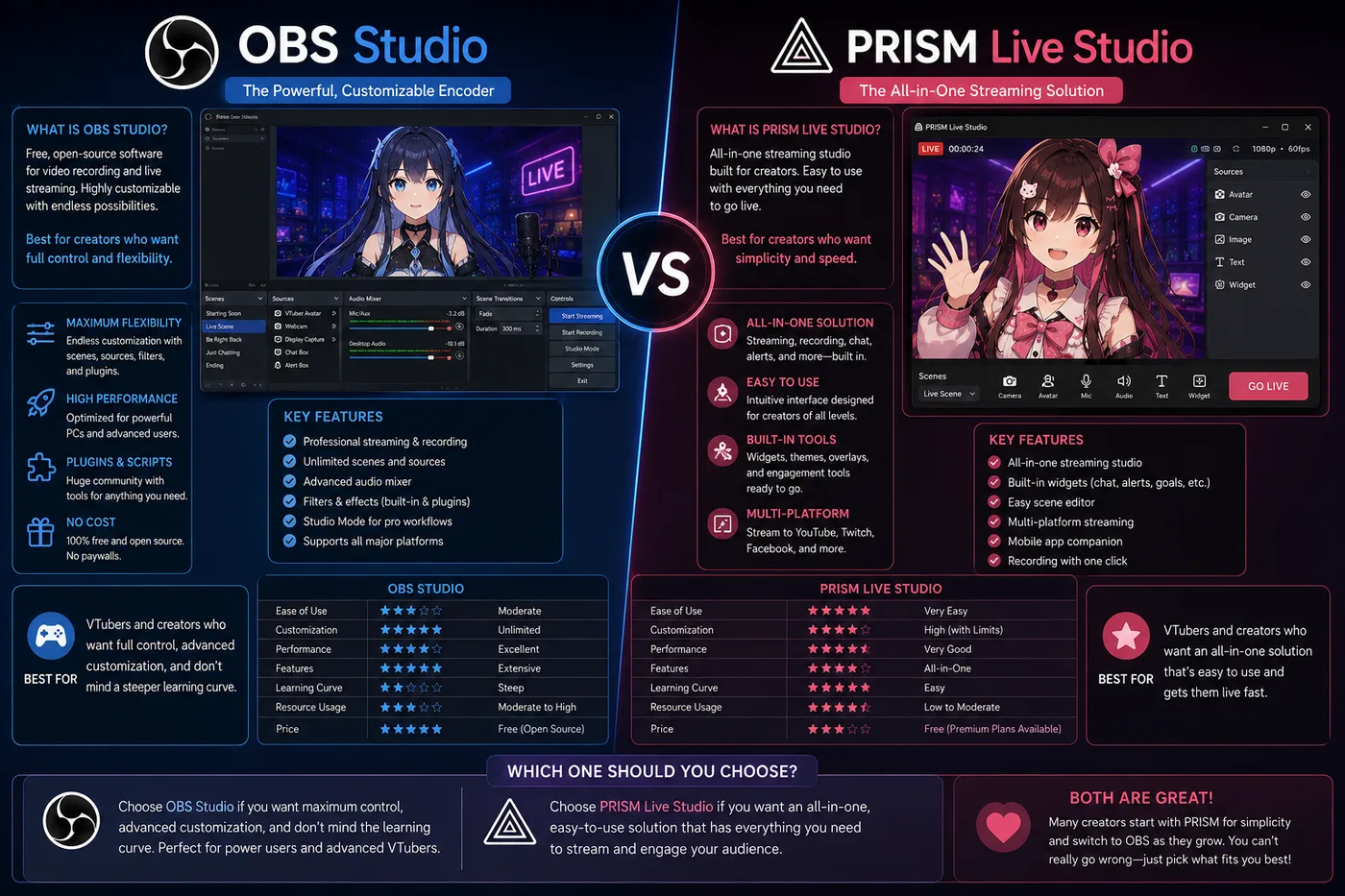
OBS vs PRISM Live Studio: encoder or all-in-one?
OBS vs PRISM Live Studio compares the broadcast layer—not VTube
Studio vs VSeeFace. OBS is the free open-source encoder; PRISM bundles mobile-friendly streaming
with optional avatar tracking.
Verdict: Use OBS Studio for the standard PC VTuber pipeline (tracker
→ OBS → Twitch/YouTube). Use PRISM when you want a simpler, mobile-first stack and fewer scene
windows.
| OBS Studio | PRISM Live Studio |
|---|
| Role | Encoder / scene mixer | Encoder + optional tracker |
| Price | Free | Free tier; paid features |
| Strength | Plugins, audio, layouts | Fast mobile go-live |
| Typical VTuber flow | VTS/VSeeFace → OBS → platform | PRISM-only or hybrid |
Pick OBS when you run Streamlabs/SE alerts, multiple scenes, or dual-PC; your tracker outputs a
window capture; or you want every VTuber tutorial to apply verbatim. Pick PRISM when phone
streaming matters and OBS feels heavy, or you want tracking + go-live without building five
scenes first. OBS does not move your Live2D mesh—pair it with VTube Studio or VSeeFace. OBS vs VTube Studio and OBS vs VSeeFace are wrong searches: you
need both layers.
Common mistakes + live checklist
Mistakes to avoid
- Downloading Cubism expecting a moving avatar on Twitch tonight
- Installing VSeeFace for a Live2D folder (or VTS for a VRM-only file)
- Installing vtubermaker for a Live2D commission
- Uploading VRM 1.0 without converting to 0.x when Editor rejects the file
- Skipping OBS and wondering why the platform only sees a desktop wallpaper
- Buying three tracking apps before commissioning a licensed model
- Assuming a phone TikTok filter is the same as a full VTuber app pipeline
-
Using built-in avatars for monetized brand work without reading commercial license terms
- Treating vtubermaker as a model creator—use VRoid to design, Maker to perform
Quick checklist before you go live
- Open your model folder — Live2D or VRM?
- Download the matching tracker only
- Install OBS (or PRISM if you want all-in-one)
- Test virtual camera / window capture with transparency
- Fix mic levels before chasing tracking perfection
- Confirm model license allows monetized streams
- Private/unlisted test stream before debut
- Upgrade (Warudo, iPhone, Cubism) only after basics work
What to read next
A VTuber app does not make you a Virtual YouTuber by itself. A model you can
legally stream, a tracker that fits that model, and a broadcast tool you have tested once—that is
the download list that actually matters.
Debut: how to become a VTuber · what is VTubing. Models and licenses: VTuber models · free VTuber models. Stream chrome: overlays hub. Product cards above link to
official docs for each tool—BeTuber indexes tools; it does not host cracks or unofficial
installers.