Profile
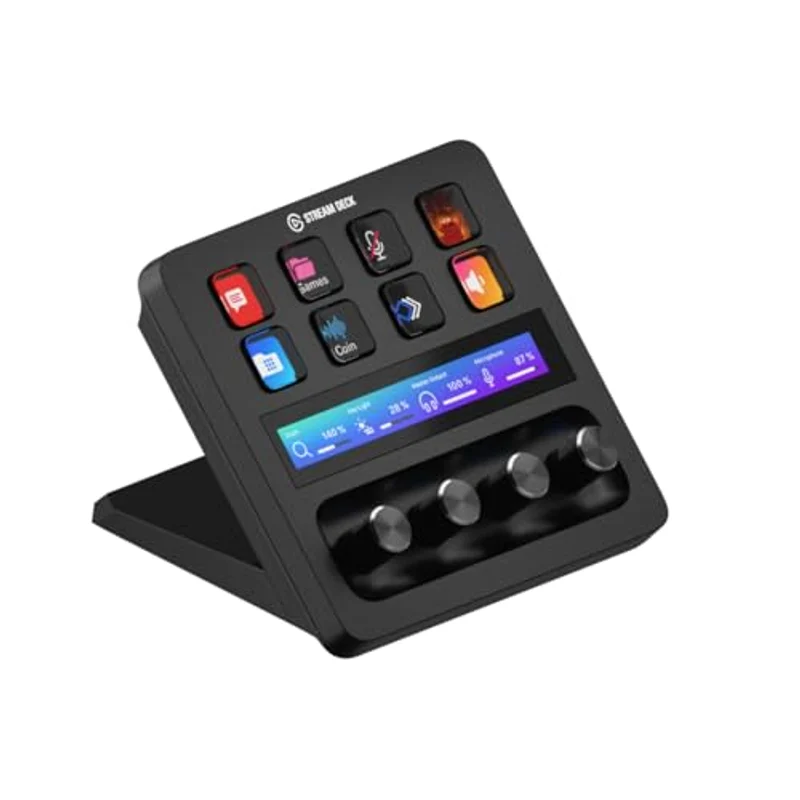
Elgato Stream Deck + is the Stream Deck you buy when a grid of keys is not enough. Eight LCD keys sit above a narrow touch strip and four metal dials. VTubers use that extra hardware to ride mic, game, Discord, and headphone levels, or to dim a Key Light, without tabbing out of VTube Studio mid-sentence.
Buy Plus if you already mix several sources or lights by mouse. Skip it if you only need expression and scene keys—that is the MK.2.
Why a virtual streamer would want dials
Live2D chatting is hands-busy: you still need to swap expressions, fire a raid scene in OBS Studio, and keep voice chat from clipping the tracker mic. Keys are great for binary actions (mute, expression 3, BRB scene). Dials are better for continuous jobs—Wave Link faders, camera zoom, light temperature—because a twist is faster than a mouse on a tiny OBS mixer while you keep eye contact with the camera.
The touch strip is a glanceable meter strip and a swipe surface for extra pages. Treat it as overflow, not as a second Stream Deck.
Plus vs MK.2 on a VTuber desk
Stream Deck MK.2 gives you fifteen keys and almost no analog controls. Plus gives you eight keys and analog controls. If your overlay already has a dozen expression toggles, MK.2 fills that grid. If your bottleneck is mixing after you already have a small pad—or you want one device that feels like a mini production surface—Plus is the one with knobs.
Neither device authors a model. You still need a licensed avatar and a tracker from the software hub.
Setup order that actually ships
Install the Stream Deck app, then plug USB-C. Create a VTuber profile: one folder for tracker hotkeys, one for OBS scenes, one for Discord/mute. Put the four dials on Wave Link (or your interface) so the touch strip shows the source you are riding. Only then decorate icons. Pretty keys that do nothing waste a stream.
A practical Wave Link assignment
On a VTuber desk, dial 1 is usually your voice, 2 is game, 3 is Discord, and 4 is headphones. Use the touch strip as the name and meter for whichever channel you are riding. On the keys, fold expressions, OBS, and lights instead of laying all eight keys flat—that grid overflows the week after debut.
OBS and Wave Link plugins are enough on day one. Huge Photoshop or DAW profiles can wait until you actually stream editing. Smart Profiles are handy, but VTubers who keep a tracker and OBS in front at once get surprise layout switches; start with a manual VTuber profile.
Limits
Eight keys fill up fast; use folders and pages instead of buying a second deck on day one. Plus will not fix a bad USB mic or a dark face for tracking. Pair it with a dynamic like the Shure MV6 or MV7+ and a tracker you already trust. Route a longer USB-C cable behind the desk so you do not yank the webcam stand. XLR Dock is an optional accessory if you want the mic path behind the deck, not a requirement. Dial Stack can change actions if you mash a knob mid-stream—add it after you are used to the hardware.