
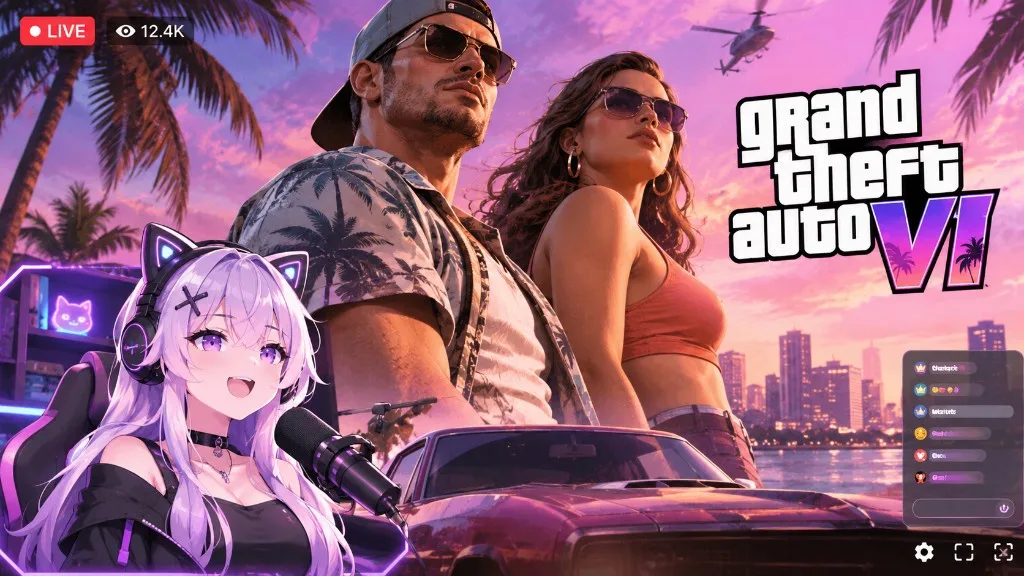
How to stream GTA 6 is going to be one of the most searched streaming questions of the year, and most answers will stop at “plug in a capture card.” This guide is for the version where you are a VTuber: a character in the corner of Vice City, reacting live, while the game runs on a console. You will set up the capture, place the avatar so it does not fight the HUD, keep your audio and music safe, and plan a GTA VI show people return for.
If you have never gone live with an avatar, skim how to live stream as a VTuber first. If you do not have a character yet, the fastest path is at the end of this page.
What you need to stream GTA 6 (VI) as a VTuber
GTA 6 launches on PS5 and Xbox Series X|S on November 19, 2026. No PC version has been announced for launch. That one fact shapes the whole setup: the console plays the game, and a computer handles everything chat sees.
| Piece | Job | Notes |
|---|---|---|
| PS5 or Xbox Series X|S | Runs GTA 6 | Disable HDCP on PS5 (below) |
| Capture card | Brings console video into the PC | USB or PCIe, 1080p60 with 4K passthrough is plenty |
| PC or Mac | Composites game + avatar + chat, encodes | A mid-range laptop is fine, the console does the heavy lifting |
| Webcam or phone | Drives the avatar’s face | Chat never sees it |
| Mic + headphones | Your voice, without echo | Mic goes into the PC, not the controller |
| VTuber studio | Avatar, scenes, overlays | BeTuber, or a tracker plus OBS |
Why not stream straight from the console? The PS5 and Xbox broadcast buttons send the game and, at best, a webcam rectangle. They cannot put an animated character on top of the gameplay. For a GTA 6 VTuber stream, the console’s built-in broadcast is a dead end.
Step 1: Capture GTA 6 from your console
- PS5 only: turn off HDCP. Go to Settings > System > HDMI and disable Enable HDCP. With it on, your capture card shows a black screen. Xbox Series consoles do not block game capture the same way.
- Wire it: console HDMI → capture card In; capture card Out → your TV or monitor. Passthrough means you play with zero added lag while the PC records a copy.
- Set the console to 1080p60 for the stream feed if your card does not handle 4K capture. Your TV can still get 4K through passthrough on most modern cards.
- Add the card in your studio as a video capture source and pick its audio input too, so game sound arrives with the picture.
Never play off the preview window on your PC. It is delayed, and GTA driving with half a second of lag is how chat watches you hit every palm tree on Ocean Drive.
Step 2: Add your VTuber avatar as its own layer
The avatar should be a separate layer above the game, with a transparent background. Your face tracking runs on the webcam, your voice drives the mouth, and expressions sit on hotkeys you can hit between missions.
In BeTuber, the character, the face tracking, the mic-driven mouth and the expressions live in one app. You can go live from there, or copy a browser-source URL and drop the avatar into OBS on top of the capture card. In a classic stack, you run VTube Studio or VSeeFace, send a virtual camera into OBS, and key out the background. Both work. One has fewer windows open while GTA is loading.
Hotkey three faces before launch day: a laugh for crashes, a deadpan stare for five-star wanted levels, and a shocked face for story twists. GTA is a game of sudden chaos, and a tracked neutral smile during a helicopter crash looks like the character fell asleep.
Step 3: Build a GTA 6 stream layout that respects the HUD
GTA is busy. The minimap, the phone, wanted stars, money, weapon wheel and mission text all need space. GTA games traditionally put the minimap bottom-left and the phone bottom-right. Check the final GTA 6 HUD on day one and place the avatar in the corner that stays empty while you drive.
- Size: around 20–25% of the screen height. Bigger blocks the road, smaller makes your expressions invisible on mobile.
- Chat: a slim, semi-transparent column on the edge, like the one in the header image. Never across the center of the screen.
- Scenes to make once:
- Starting Soon with a Vice City-style background and a countdown
- Gameplay with the avatar in its corner
- Cutscene with the avatar smaller, so the story breathes
- Just Chatting / BRB with the avatar large over a scenery background
- Contrast check: GTA 6’s Leonida is all neon, sunsets and saturated pinks. A purple-haired avatar can melt into a purple sky. Add a thin outline or soft shadow behind the character.
BeTuber’s AI Imagine can generate a sunset skyline or neon street for your Starting Soon and BRB scenes, and its overlays include a countdown, a goal bar, and live Twitch alerts and chat, all styled to match. Browse ideas in VTuber overlays and VTuber scenes.
Step 4: Audio and music rules for GTA 6 streams
Audio matters more than the avatar. Chat will forgive a simple model. They leave over echo and a voice buried under explosions.
- Mic into the PC, not into the DualSense or the Xbox controller.
- Headphones on the PC or the capture card monitor out, so the TV speakers do not bleed into your mic.
- Game audio lower than your voice. Aim for your voice peaking around -10 dB with the game sitting well under it. GTA gunfights are loud. Test one on purpose.
- Licensed music is the real risk. GTA radio stations are full of real songs. Those can get Twitch VODs muted, clips removed, and YouTube videos claimed. If GTA 6 offers a streamer-safe or copyrighted-music toggle, use it. If not, turn the radio down, use a safe station, or talk over the drive.
Rockstar has historically allowed gameplay streaming and monetized videos of its games. The game is fine. A full licensed song playing for three minutes during a car chase is the part that gets you a strike.
Step 5: Twitch and YouTube settings for GTA 6
- Category: Grand Theft Auto VI, not Just Chatting. Launch week discovery happens in the game directory.
- Content classification: GTA is a mature-rated game. On Twitch, set the mature-rated games label. On YouTube, expect age restrictions on some VODs.
- Title: character plus hook in plain words. “Cat VTuber’s first night in Vice City (blind, no spoilers)” beats “GTA 6 STREAM!!!”.
- Spoilers: say in the title whether you are going blind or racing the story. Chat will tell you either way.
- Bitrate: 6000 kbps at 1080p60 on Twitch is the common ceiling. Open-world driving is hard to encode. If the road turns to blocks, drop to 936p or 720p60 before you cut the frame rate.
GTA 6 VTuber stream ideas that stand out on launch week
Thousands of people will stream GTA 6 on November 19. A face in a corner is not a reason to watch. A character with a hook is.
- Stay in character in Vice City. A tourist who refuses every mission, a “lawful” cop who only drives at the speed limit, a fox who steals only yellow cars.
- Chat runs the GPS. Viewers vote where to drive next with channel points.
- Bounty nights. Each sub adds a wanted star you must survive with.
- The radio critic. You rate the stations live, which also keeps the music short.
- Blind story first, chaos second. The first week is story, then your recurring “Friday chaos” show.
Clip the moment the avatar’s face reacts to a crash. GTA moments are short, loud and shareable, which makes them ideal for Shorts, TikTok and Reels. Cut 30–60 seconds: the setup, the crash, your face, and an end card with your next stream time.
Common mistakes when streaming GTA 6 as a VTuber
- Leaving HDCP on and wondering why OBS shows a black screen
- Playing off the delayed PC preview instead of the passthrough TV
- Covering the minimap or the phone with the avatar
- Mic plugged into the controller, game audio louder than the voice
- Three-minute licensed songs in every VOD
- No hook, just “GTA 6 stream,” in a category with 10,000 live channels
The fastest way to become a GTA 6 VTuber before launch
If you do not have a VTuber yet, you do not need weeks of commissions to stream GTA 6. BeTuber is a VTuber studio that does the whole chain in one place:
- Create your character. Hit Randomise, fine-tune hair, face and style, or let AI design the character for you. No finished Live2D file needed.
- Make it perform. Your webcam tracks the face, your mic moves the mouth, and shortcuts trigger expressions.
- Build the Vice City stage. Generate scenery with AI Imagine and add overlays with a countdown, Twitch alerts and chat.
- Go live. Stream from BeTuber, or drop the browser source into OBS on top of your capture card.
You can have a character, a Starting Soon scene and a GTA layout ready before release night. Create your VTuber in BeTuber and run a private test with any console game this week, so November 19 is not your first time pressing Go Live.
Related reading
- How to live stream as a VTuber
- How to live stream without showing your face
- How to create a custom VTuber avatar
- Best VTuber software · VTuber overlays
- How to become a VTuber
Bottom line
Streaming GTA 6 as a VTuber comes down to a console into a capture card, a PC that layers your avatar over the game, a corner the HUD does not need, a voice louder than the explosions, and music you will not get muted for. The setup takes an evening. The hook is what keeps chat after the launch rush ends, so build the character now and let Vice City be the stage.