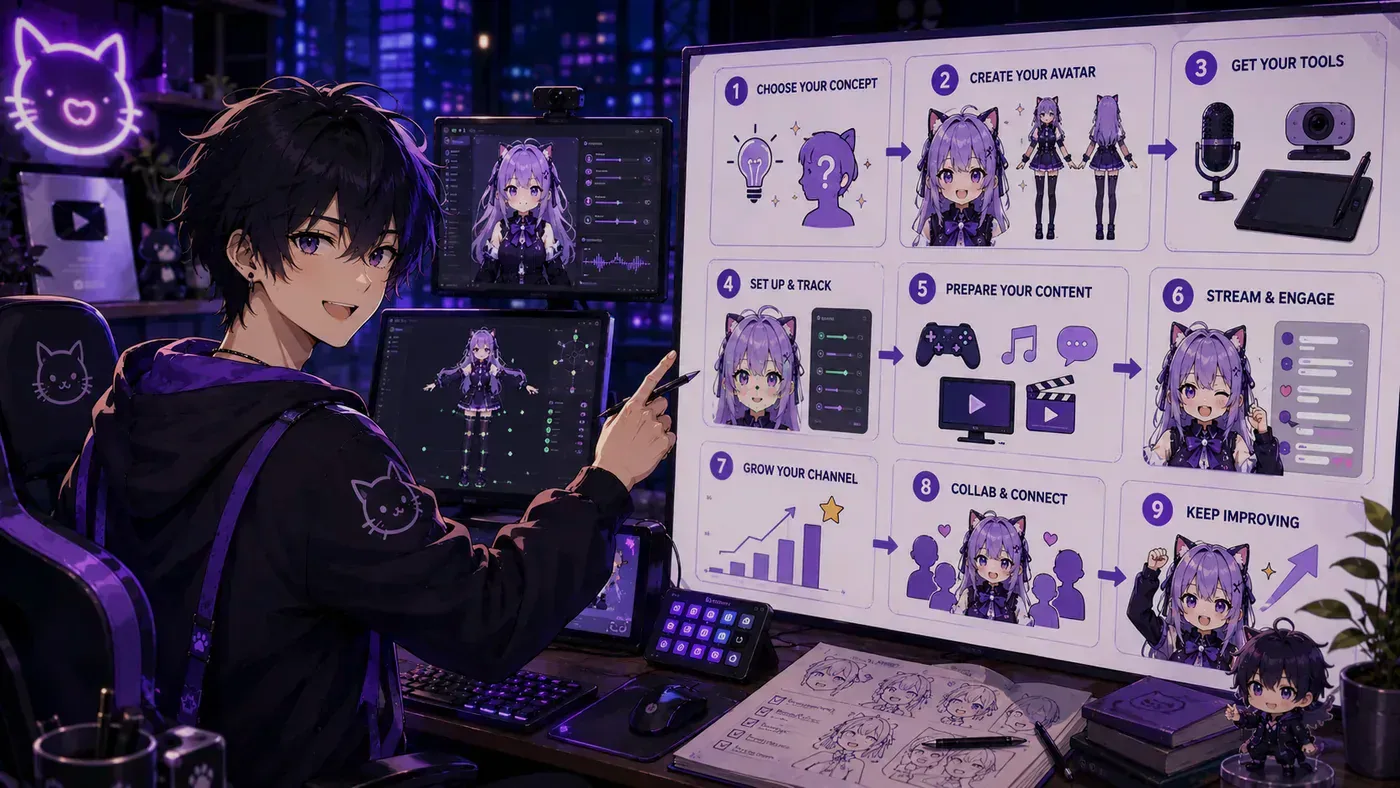
How to live stream as a VTuber—also searched as how to live stream as a Virtual YouTuber—means going live with a digital avatar as your public face on Twitch, YouTube, or similar. The job is still streaming: show up, talk, play or create, and return on a schedule. The difference is the character layer between you and the audience.
This page is the live-ops guide: model → tracking → OBS → platform → debut habits. For the full career ladder (lore, gear order, monetization), use how to become a VTuber. For the definition, see what is a VTuber. If your goal is privacy first, also read how to live stream without showing your face.
What you need before you press “Go Live”
Think in four layers. Mixing them up is how beginners buy the wrong app.
| Layer | Job | Common tools |
|---|---|---|
| 1. Model | The art that moves | PNG sheet, Live2D .model3.json, VRM |
| 2. Tracking / toggle | Mouth, head, expressions | Veadotube, VTube Studio, VSeeFace, Warudo |
| 3. Broadcast | Mix avatar + game + mic + alerts | OBS Studio, PRISM Live Studio |
| 4. Platform | Audience + discovery | Twitch, YouTube, Bilibili, etc. |
Live2D Cubism is for making a 2D rig—not for streaming. Streamers load the export into a tracker. Details: best VTuber software and the VTuber app hub.
Step 1 — Choose an avatar you can ship this month
PNGTuber — idle + talking PNGs; fastest legitimate debut. Full guide: PNGTuber.
Premade / free Live2D or VRM — faster than a commission; verify commercial license. Start: free VTuber models.
Commission — unique look; budget art and rigging separately; wait weeks.
Studio generate — BeTuber or photo-to-avatar if you want creation and practice in one place.
Ship one avatar decision. Three open tabs is not a debut plan. Readable silhouette at phone size beats tiny eyelashes nobody sees.
Step 2 — Wire tracking to the file type
- Live2D → VTube Studio (webcam/phone → virtual camera)
- VRM / 3D → VSeeFace or Warudo
- PNG → mic threshold + hotkeys (Veadotube or OBS show/hide)
Do not install VSeeFace hoping a Live2D folder will open. File type picks the tracker—see VTube Studio vs VSeeFace. Soft front light and eye-level camera help tracking more than buying Pro on day one.
Five-minute tracker ritual: lights → frame (head + shoulders) → calibrate neutral/smile/surprise → talk ten seconds → confirm blink and mouth.
Step 3 — Build a boring, reliable OBS layout
- Scene
Live: Video Capture Device = tracker virtual cam; mic on its own source; simple background; game/window capture. - Duplicate to
Starting SoonandBRB(reuse mic/cam references—do not open the webcam twice). - Canvas 1920×1080; drop to 720p output if the PC struggles.
- Hotkeys for scene swaps that do not collide with expression keys.
- Record 30–60 seconds locally on headphones: avatar in frame, no echo, no black frames, levels ~-12 to -6 dB.
OBS is the encoder layer, not a competitor to VTube Studio. If you want a shorter stack, compare OBS vs PRISM—still keep avatar tracking as its own job.
Step 4 — Audio before cosmetics
Chat stays for a simple model with clear voice. They leave for echo, clipping, or a dying headset mic.
- Headphones (prevent speaker bleed)
- Mic fist-width off-axis; noise gate if your room is noisy
- Character voice optional—hydrate and rest if you use one
- Never bury the mic only in Desktop Audio
Facecam lighting is secondary when the avatar is the face; mic is not.
Step 5 — Platform setup for Virtual YouTubers
- Create Twitch and/or YouTube with the same display name you can keep.
- Category: Just Chatting, the game you play, or Art—match reality.
- Title: character + activity in plain language (“Fox VTuber first horror night”).
- Panels / About: schedule, socials, model credit if required.
- Stream key into OBS; test to an unlisted/private stream if YouTube allows, or a short public test with a clear “tech test” title.
Dual-streaming is optional. Master one ingest before you fight two chat windows.
Step 6 — Debut night checklist
- Tracker calibrated; virtual cam visible in OBS
- Mic levels checked; headphones on
- Starting Soon → Live → BRB practiced once
- License allows this stream (and monetization if tips are on)
- Water nearby; phone silent
- One-sentence open: who you are, what today is, when you usually return
First five minutes script: greet → name → today’s plan → where to follow → talk to chat. Perfect jokes optional; silence is not.
When something breaks live: BRB → restart tracker → return. Drill that offline for ~90 seconds. Broader career checklist lives in how to become a VTuber.
After you are live: clips and consistency
Virtual YouTuber discovery in 2026 still runs on Shorts / TikTok / Reels and searchable VODs—not only the “stream is live” bell.
- Keep a weekly slot you can actually honor (shorter is fine).
- Timestamp funny beats live.
- Cut one 30–60s clip: hook → payoff → next-stream end card.
- Post to at least two short surfaces.
- Reply for 20–30 minutes after; early community temperature matters.
Agencies are not required to clip. Indie Virtual YouTubers who return weekly beat perfect one-off debuts that vanish.
Monetization without wrecking the first month
Order that usually works: tips with real reactions → platform subs once regulars exist → merch/sponsors later. Empty sub buttons teach people to ignore you. Adult paywalls are optional and separate—only with written model rights and age gates; see VTuber Fansly / OnlyFans if that is even your lane.
Common VTuber live-stream mistakes
- Buying software before knowing Live2D vs VRM vs PNG
- First public stream = first time hearing your mic delay
- Twenty outfits, zero personality rules or schedule
- Stolen “free model” packs
- Treating the avatar as finished content and skipping chat
Related reading
- How to live stream without showing your face
- How to become a VTuber
- What is a VTuber?
- PNGTuber · Free models
- Best VTuber software · Rigging
- Agencies vs indie
Bottom line
Live streaming as a VTuber / Virtual YouTuber is avatar + tracking + broadcast + schedule. Pick a shippable model, wire the correct tracker, composite in OBS, protect audio, and debut with a checklist—not a hope. The character is what chat follows; the stack only has to be stable enough that the character can show up again next week. Open the studio when the private test already works: BeTuber.